
Choosing a Best Digital Door Lock means deciding how you will unlock your door, how far your Wi-Fi reaches, and how many codes you need to issue to family, guests or service visitors. The right fit depends on those three answers more than on the brand name.
Full front lock sets with handles suit people replacing their whole entry hardware. Deadbolts suit doors where you only need to swap the lock cylinder. Battery-powered options with fingerprint readers suit buyers who want quick, keyless entry for daily use. Electronic door locks also suit homes where many people need occasional access.
Five Digital Door Lock Options Compared
Each card below lists one product’s unlock methods, connection type, code capacity and fingerprint or auto-lock details. Start with the connection and the passcode limits, then check whether the product includes handles or only a deadbolt.

Philips Wi-Fi Front Lock Set with 2 Handles

Ulecoce SL03 Front Door Lock Set with Keyless Entry

Philips 4200 Series WiFi Keypad Deadbolt with Handle

Philips Wi-Fi Smart Deadbolt Lock With Keyless Entry
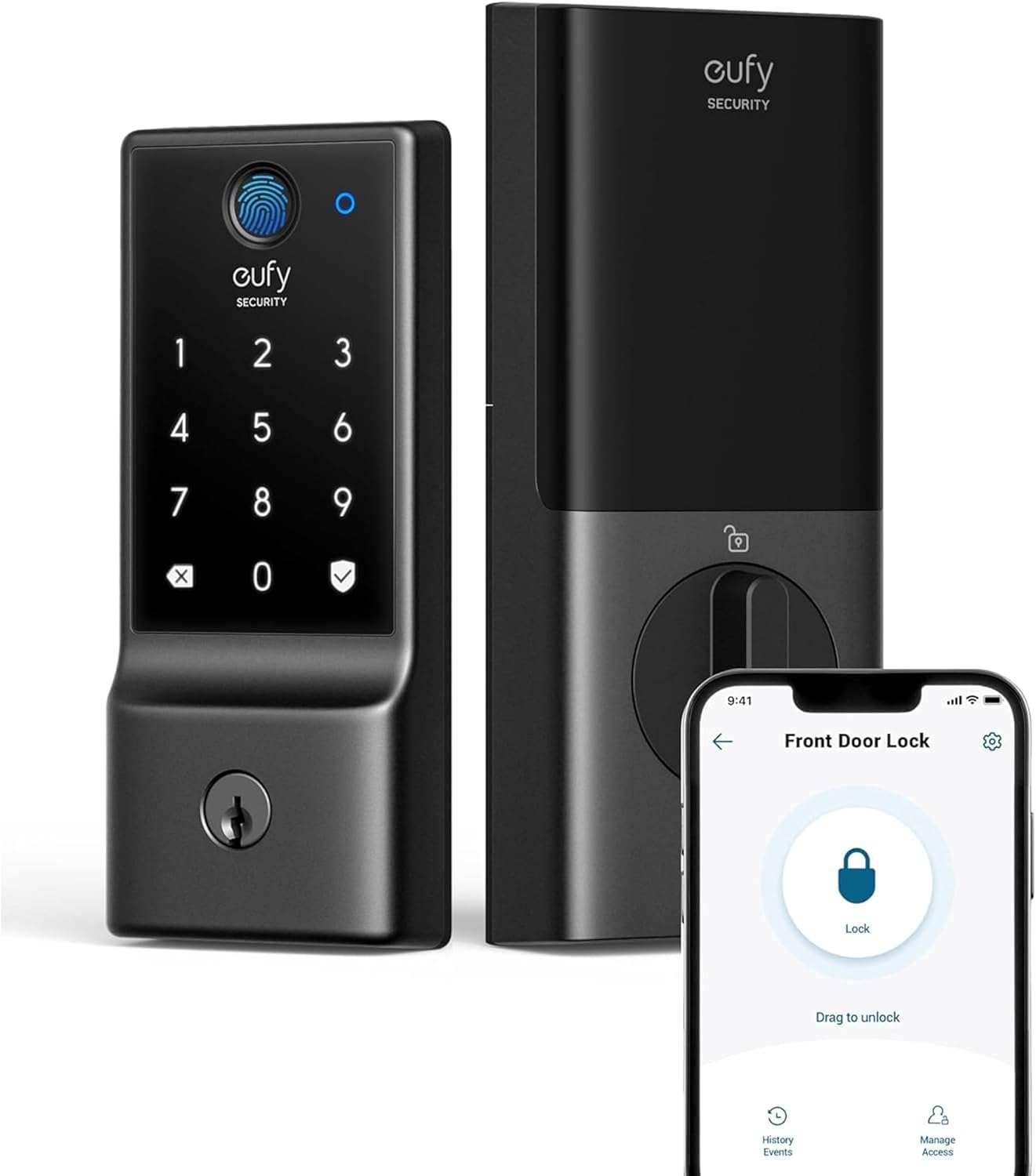
eufy Smart Lock C220 Fingerprint Keyless Entry
How the Five Locks Differ on Key Specs
These four attributes show where the listed specs differ most. Values are taken directly from each manufacturer’s listing, and “Not listed” means the spec does not appear in that listing. Households that want keyless entry without a physical key often weigh a Wi-Fi front door lock against a keypad model.
| Product | Connection | Passcode capacity | Auto-lock timer | Fingerprint unlock |
|---|---|---|---|---|
| Philips Front Lock Set | Wi-Fi with Philips app | Up to 100 user codes | 30 to 180 seconds | Not listed |
| Ulecoce SL03 Lock Set | Bluetooth up to 5 m | 100+ keypad codes | 5 to 90 seconds | Not listed |
| Philips 4200 Deadbolt | 2.4GHz Wi-Fi, no hub | Not listed | Not listed | 0.3 second |
| Philips Smart Deadbolt | 2.4GHz Wi-Fi, no hub | Up to 100 passcodes | Not listed | Multiple fingerprints |
| eufy C220 Smart Lock | Built-in Wi-Fi, no bridge | Not listed | Not listed | Under 1 second |
Which Digital Door Lock Fits Your Door
Your door setup, Wi-Fi coverage and household routine matter as much as the unlock list. Use these factors to narrow the field before you compare models.
- Whether you need a full set with handles or a deadbolt only
- Distance from your Wi-Fi router to the door
- How many passcodes you expect to issue
- Whether you want a physical key as a backup
Replacing an Entire Front Door Set
The Philips Front Lock Set suits people replacing the whole entry hardware, since it includes two handles and lists app, fingerprint, PIN, key and voice unlocking. Its 30 to 180 second auto-lock range covers many routines. The Ulecoce SL03 is the alternative, with a 5 to 90 second auto-lock and five physical keys, but it needs a separate gateway for Alexa or Google Assistant control. The choice of fingerprint lock for a front door depends on how many people enter each day.
Doors Where You Want No Hub
The Philips 4200 Series Deadbolt connects directly to a 2.4GHz home network with no hub and lists a 0.3 second fingerprint unlock. Its listing asks for the lock to stay within 33 ft (10 m) of the router. The eufy C220 is the alternative, with built-in Wi-Fi and no bridge, but its listing does not give a range figure.
Longer Battery Intervals
The eufy C220 suits buyers who want fewer battery changes, since its listing states about 8 months from 8 AA batteries. That figure may vary with use. The Philips Smart Deadbolt is the alternative, with up to 100 passcodes and batteries not included, so you would need to supply your own.
Households Issuing Many Codes
The Ulecoce SL03 suits households that share access widely, since it lists 100+ keypad codes and one-time guest codes. Its app-based access logs also show who entered. The Philips Front Lock Set is the alternative, with unlimited one-time PINs and up to 100 user codes, but it has a shorter auto-lock range than the Ulecoce SL03 offers in its listing.
How We Grouped These Locks
We compared the specs each manufacturer lists, including connection type, passcode capacity, auto-lock timer, fingerprint speed, battery information and whether a hub or bridge is required. We grouped the products by door setup, Wi-Fi distance and household needs, so each buyer can match a lock to their own situation. This guide does not report hands-on testing.
Our Recommended Digital Door Locks
The five picks below are listed in order, with each one matched to the buyer it suits best. Read the reason for each to see which listed spec makes it stand out. The right smart lock for the front door depends on whether you need keypad entry or remote unlocking.
Handles and app control: Philips Wi-Fi Front Lock Set with 2 Handles: Philips Front Lock Set suits people replacing a full front door set with coordinated handles. It lists five unlocking methods and app-based access history. Choose another product if you only need a deadbolt for an existing handle.
Five physical keys: Ulecoce SL03 Front Door Lock Set with Keyless: Ulecoce SL03 Lock Set suits households that want a physical key backup and many keypad codes. It lists five keys and 100+ keypad codes. Choose another product if you need voice control without buying a separate gateway.
Fastest stated fingerprint: Philips 4200 Series WiFi Keypad Deadbolt with Handle: Philips 4200 Deadbolt suits doors without a hub and buyers who value quick fingerprint entry, which it lists at 0.3 seconds. Choose another product if your router is farther than 33 ft (10 m) from the door.
Digital Door Lock Questions Answered
How do I set up a Wi-Fi door lock?
Most listings describe a setup through the manufacturer’s phone app. Connect the lock to a 2.4GHz Wi-Fi network, since several listings state that 2.4GHz is required. Keep the lock within the distance your listing states from the router, and follow the app prompts to add users and codes. Homes with several exterior doors often need a mix of home door locks, so match each lock to its entrance.
What powers these locks?
The eufy C220 uses 8 AA batteries, and its listing states about 8 months of life. The Philips Smart Deadbolt lists batteries as not included. Check your chosen listing for its power details before installing, and plan to replace or recharge batteries when the app shows a low battery status.
Where should I place the lock’s Wi-Fi router?
Position your router so that its distance to the lock falls within the range your listing gives. The Philips 4200 Series asks for 33 ft (10 m) or less and advises reducing walls and metal objects in between. The Philips Smart Deadbolt lists 65 ft for better remote control.
How often should I change the batteries or check the lock?
Check battery levels in the app regularly, and replace batteries when the app or listing indicates they are low. Test the lock by locking and unlocking it manually after any change. Also test your smoke alarms once a month, as the NFPA recommends, because a lock does not replace them.
Who can see the lock’s access history?
Several listings state that the app shows access history and user permissions. Review who has codes or fingerprints enrolled, and remove any codes you no longer need. Check your app settings and account sharing options so that only people you trust can manage the lock.





