
Shoppers looking for Best Automatic Front Door Locks usually want three things: a way in that suits their household, a lock that locks itself after the door closes, and a power source they can keep up with. Each model here covers those needs in a different way. Rental properties with frequent guest turnover add a separate layer to that decision, covered in our notes on door locks for short-term rentals.
A Wi-Fi app set suits people who want remote control and voice commands. A keypad deadbolt suits doors where codes are enough. A fingerprint model suits households that want quick entry without a phone.
Which Automatic Front Door Lock Specs Matter Most
Start with how you will unlock the door, how many codes you need, and how long the lock waits before it locks itself. Then check power and connectivity, since these decide what you must maintain and what needs a gateway or Wi-Fi network.

Philips Wi-Fi Front Lock Set with 2 Handles

TEEH0 TE001 Keyless Entry Deadbolt with Keypad for Front Door

Veise VE06-H Smart Front Door Lock Handle Set With App Control

Philips 4200 Series WiFi Keypad Deadbolt with Handle
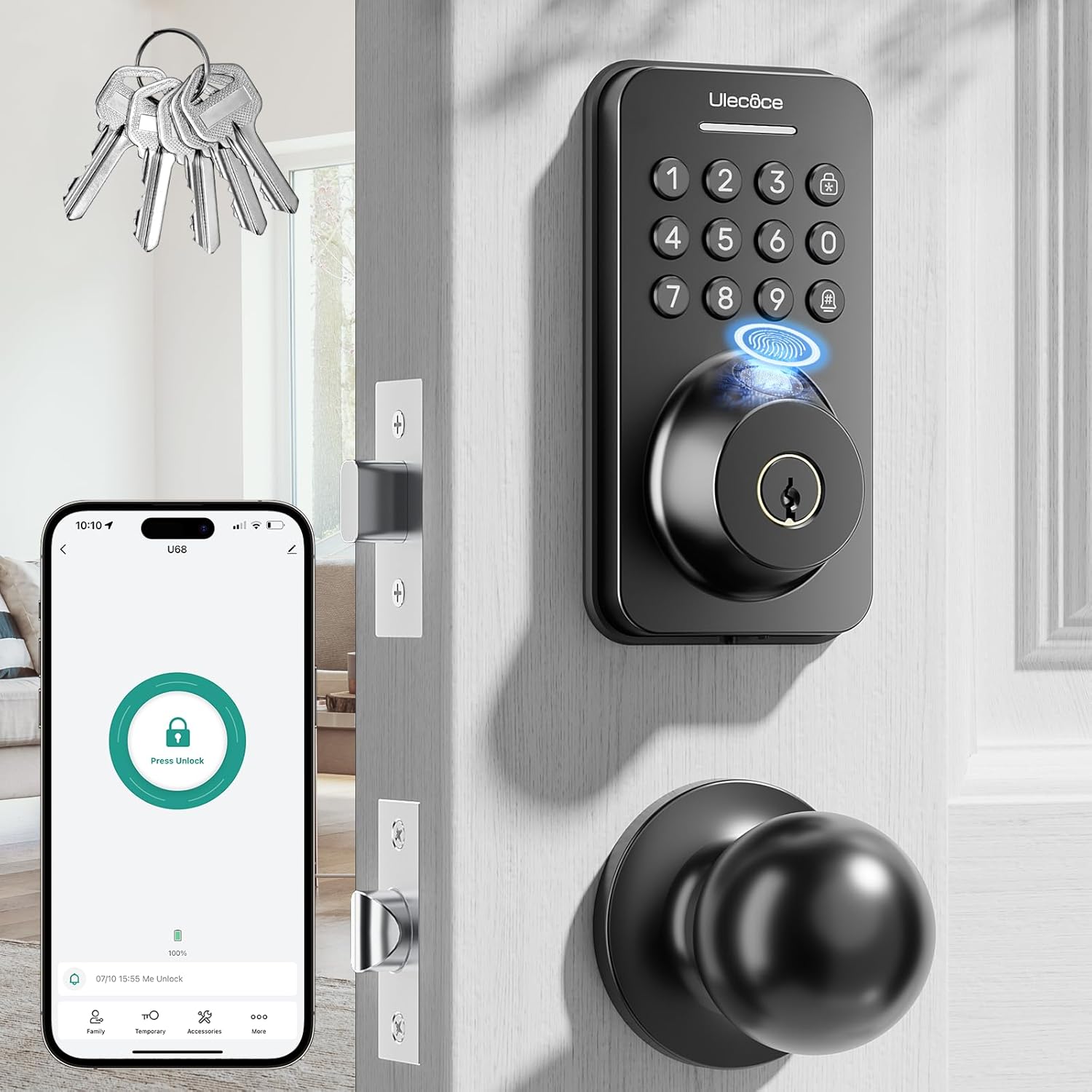
Ulecoce U68 Fingerprint Deadbolt with Knob Set
How the Five Automatic Front Door Locks Compare on Listed Specs
The table lists the specs that differ most across these five products. Where a product does not list a value, the cell says so instead of guessing. Similar comparisons apply to electronic front door locks for home entry.
| Product | Unlock methods | User codes | Auto-lock timer | Connectivity |
|---|---|---|---|---|
| Philips Wi-Fi Lock Set | Five methods incl. voice | Up to 100 user codes | 30 to 180 seconds | Wi-Fi app control |
| TEEHO TE001 Deadbolt | Keypad codes | 20 access codes | 10 to 99 seconds | Keypad, no app listed |
| Veise VE06-H Handle Set | Five ways incl. app | 250+ user codes | Auto-lock feature | App, gateway for voice |
| Philips 4200 Deadbolt | Keypad, app, fingerprint | Multiple PIN types | Timer not listed | 2.4GHz Wi-Fi, no hub |
| Ulecoce U68 Fingerprint | Fingerprint, keypad, app | 512 fingerprints and codes | 5 to 60 seconds | App, gateway for voice |
Which Automatic Front Door Lock Fits Your Entrance
Your entry point, your power setup and who needs access should guide the choice. The points below separate the models by how they are used.
- Remote control from a phone
- Voice commands through a smart home assistant
- Battery upkeep and replacement schedule
- Number of guest or household codes
Households that want app and voice control
The Philips Wi-Fi Lock Set suits homes that want to lock, unlock and check door status from a phone, with voice commands through Amazon Alexa or Google Assistant listed. Its one-time PIN codes expire after use, which suits deliveries and visitors. The trade-off is that it depends on a Wi-Fi connection. The Veise VE06-H Handle Set is an alternative, but its voice control needs the Veise G2 gateway, sold separately.
Keypad-only doors with simple battery care
The TEEHO TE001 Deadbolt suits a front door where codes are enough and no app is needed. It is powered by 4 AA batteries, not included, which the specs say last up to 365 days, and a red light appears when battery level drops below 15%. The trade-off is that its listed features do not include app control. The Philips 4200 Deadbolt is an alternative that adds app control with a direct 2.4GHz Wi-Fi connection, though it asks that the lock stay within 33 ft (10 m) of the router.
Homes with many guests or house sitters
The Veise VE06-H Handle Set suits households that share access often, because its specs list 250+ user codes and remote eKeys for guests and house sitters. It also lists privacy mode and passage mode. The trade-off is that voice control needs the separate G2 gateway. The Philips Wi-Fi Lock Set is an alternative with up to 100 user codes and a 30 to 180 second auto-lock timer.
Quick entry with fingerprint access
The Ulecoce U68 Fingerprint Set suits people who arrive with full hands and want entry by fingerprint in 0.3 seconds. Its auto-lock can be set from 5 to 60 seconds after the door closes. The trade-off is that voice control also needs a separate gateway. The Philips 4200 Deadbolt is an alternative that also offers fingerprint access in 0.3 seconds.
How These Automatic Front Door Locks Were Compared
This guide compares the manufacturer specs for unlock methods, user code counts, auto-lock timers, power source, weather resistance, connectivity and gateway needs. The products are grouped by entry point, power setup and household needs so each buyer can see which listed features match their door. Where a spec is not listed, this guide says so.
Our Recommended Automatic Front Door Locks
These three picks cover app control, keypad-only use and code sharing. Each one is chosen for a specific listed feature, so compare them with the situations above. Homeowners who want a broader comparison of entry hardware can start with front door locksets with deadbolts.
Unlimited one-time PINs: Philips Wi-Fi Front Lock Set with 2 Handles: The Philips Wi-Fi Lock Set suits households that want app control, voice commands and single-use codes for guests and deliveries. Its specs list unlimited one-time PIN codes and up to 100 user codes. Choose another product if your door has no Wi-Fi connection or you do not want a phone app.
IP54 weather resistance: TEEH0 TE001 Keyless Entry Deadbolt with Keypad for: The TEEHO TE001 Deadbolt suits keypad-only doors that need a weather rating. Its specs list IP54 weather resistance, where the 4 means it resists splashing, and a red light warns when batteries fall below 15%. Choose another product if you need app control, since its specs do not list one.
250+ user codes: Veise VE06-H Smart Front Door Lock Handle Set: The Veise VE06-H Handle Set suits homes that share access often, with remote eKeys and codes for house sitters and guests. Its specs list privacy mode and passage mode. Choose another product if you want voice control without buying a separate gateway.
Frequently Asked Questions About Automatic Front Door Locks
Do these locks need a hub or gateway to work?
Not all of them. The Philips Wi-Fi Lock Set and the Philips 4200 Deadbolt connect directly to Wi-Fi, and the TEEHO TE001 Deadbolt uses a keypad without an app listed. The Veise VE06-H and Ulecoce U68 list a gateway, sold separately, for Alexa or Google voice control. Check the gateway note before you buy.
How do I power a keypad deadbolt?
The TEEHO TE001 Deadbolt is powered by 4 AA batteries, which are not included. Its specs say they last up to 365 days, and a red light alerts you when battery level drops below 15%. Keep spare batteries on hand so you can replace them when the light appears. Battery life and alert features differ widely across the market for keypad front door locks.
How far from the router should a Wi-Fi lock be placed?
The Philips 4200 Deadbolt asks that the lock stay within 33 ft (10 m) of your Wi-Fi router. Its specs also advise minimizing walls, metal objects and interference sources. Most smart security devices connect over 2.4 GHz Wi-Fi, so check that your network supports that band before installing.
How often should I check the lock’s battery and settings?
Check battery status at least once a month, and review user codes whenever a guest or house sitter no longer needs access. Battery-powered models such as the TEEHO TE001 Deadbolt show a low battery indicator. Wi-Fi models list access history in their apps, so you can review recent entries.





