
Choosing a Best Kwikset Smart Lock starts with a simple question: how do you want to unlock your door when you have no keys in hand, and do you want to control it from your phone? Kwikset’s lineup covers both needs, from keypad deadbolts to Wi-Fi and Z-Wave models. Front door installs have their own considerations, and a separate roundup covers the best smart locks for front doors.
If you want keypad entry without an app, the SmartCode and Powerbolt models fit best. If you want remote control and guest access from a phone, the Halo model is the one to look at. Households with an existing Z-Wave hub or Ring Alarm system should compare the HomeConnect 620.
How These Kwikset Locks Compare
Look at the connection type, auto-lock options, user code capacity and listed battery life. These specs separate a basic keypad deadbolt from a lock that works with a hub or app. Not every product lists every spec, so check the gaps before you buy.

Kwikset SmartCode 260 Keyless Entry Deadbolt Door Lock with Auto-Lock

Kwikset SmartCode 270 Touchpad Deadbolt Door Lock with Lighted

Kwikset Powerbolt 250 Keyless Entry Keypad Door Lock with Auto Lock
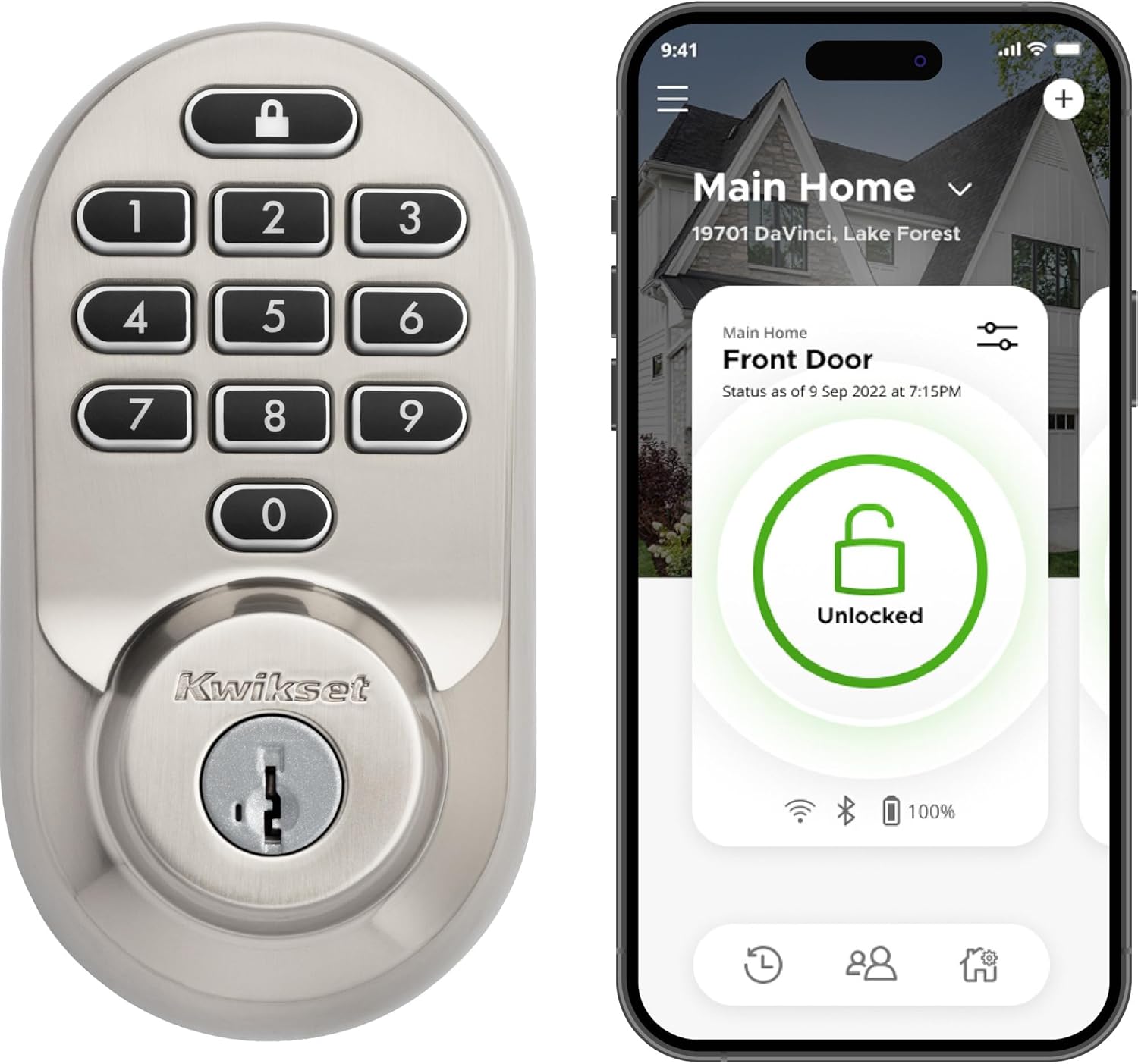
Kwikset Halo Wi-Fi Smart Lock with Keypad Keyless Entry

Kwikset HomeConnect 620 Keypad Smart Lock with Z-Wave Long Range
Key Differences Between the Five Models
The two SmartCode models share the same auto-lock range, code capacity and battery rating. The Powerbolt 250 offers fewer codes, while the Halo and HomeConnect 620 add connectivity that the other three do not list. Buyers weighing these models will find a wider selection of smart locks for home in a separate roundup.
| Product | Connection | Auto-Lock | Code Capacity | Battery Life |
|---|---|---|---|---|
| SmartCode 260 | Keypad entry | 30 sec to 10 min | 50 user, 10 one-time | At least 12 months |
| SmartCode 270 | Lighted touchpad | 30 sec to 10 min | 50 user, 10 one-time | At least 12 months |
| Powerbolt 250 | Lighted keypad | 30 sec to 10 min | 25 user, 5 one-time | Not listed |
| Halo Wi-Fi Lock | Wi-Fi app, no hub | Not listed | 250 access codes | Not listed |
| HomeConnect 620 | Z-Wave Long Range | Not listed | 250 user codes | Not listed |
Which Kwikset Lock Fits Your Door
Your entry point, your power setup and whether you already own a hub should guide your choice more than any single feature. Use these factors to narrow the list. Homes with sliding pocket doors need hardware made for that design, and pocket door locks cover that need.
- Whether you want app control or keypad-only entry
- How many access codes you need to manage
- Whether you already run a Z-Wave hub or Ring Alarm
- Whether you need entry lighting for night use
Keypad Only, No Hub Needed
The SmartCode 260 suits a front door where you want keyless entry, auto-lock and 50 user codes with a listed battery life of at least 12 months. Its alternative, the Powerbolt 250, adds LED keypad lighting and a 3-strike alarm but lists 25 user codes and 5 one-time codes. Choose the SmartCode 260 if code capacity matters more than lighting.
Lit Entry for Dark Walkways
The SmartCode 270 suits a door with low light, since its touchpad is lighted and it keeps the same 12-month battery rating and 50 user codes as the SmartCode 260. The Powerbolt 250 is the alternative for buyers who prefer a keypad layout and an alarm after 3 consecutive incorrect code entries. The trade-off is that the Powerbolt 250 lists fewer user codes.
Phone Control for Guests and Family
The Halo Wi-Fi Smart Lock suits households that want to lock, unlock and share temporary access codes from the Kwikset app. It supports up to 250 access codes and works with Amazon Alexa or Google Home. The alternative is the HomeConnect 620 for a Z-Wave setup, which also supports 250 user codes but does not list app-based guest sharing.
Existing Z-Wave or Ring Alarm Setup
The HomeConnect 620 suits a home that already runs a Z-Wave hub or a Ring Alarm system, because it lists Z-Wave Long Range, S2 encryption and Ring Alarm compatibility. It requires a Ring Alarm smart hub for Ring control. Buyers without a compatible hub should choose the Halo lock instead, which lists no hub requirement.
How We Grouped These Locks
This guide compares only the specifications listed by Kwikset for each model, including keypad type, auto-lock intervals, user code limits, battery life, grade certification, connectivity and hub compatibility. We grouped the models by how buyers enter and manage their doors, such as keypad-only, lit keypad, app-controlled and hub-based setups. No hands-on testing was involved.
Our Picks for Kwikset Smart Locks
Our picks follow the spec differences above, starting with the model that lists the most certification detail and moving toward connected options. Each pick names the spec that sets it apart from the rest of the list. The same topic of keeping doors secure around young children is covered in our guide to childproof door lock options for 2026.
Grade 2 BHMA rated: Kwikset SmartCode 260 Keyless Entry Deadbolt Door Lock: The SmartCode 260 suits buyers who want a keypad deadbolt with auto-lock, 50 user codes and a listed Grade 2 BHMA rating. Its listed battery life is at least 12 months on 4 AA alkaline batteries, which are not included. Buyers who need lit keys in low light should choose the SmartCode 270 instead.
Lighted touchpad: Kwikset SmartCode 270 Touchpad Deadbolt Door Lock with: The SmartCode 270 suits buyers who want the same Grade 2 BHMA rating, 50 user codes and 12-month battery rating as the SmartCode 260, with a touchpad that lights up. It is a good fit for dim entryways. Buyers who prefer a traditional keypad should choose the SmartCode 260.
3-strike alarm: Kwikset Powerbolt 250 Keyless Entry Keypad Door Lock: The Powerbolt 250 suits buyers who want LED keypad lighting, auto-lock intervals of 30 sec to 10 min and an alarm after 3 consecutive incorrect code entries. It lists 25 user codes and 5 one-time codes. Buyers who need more codes should choose the SmartCode 260.
Common Questions About Kwikset Smart Locks
How do I set up a keypad smart lock?
Setup depends on the model. The SmartCode and Powerbolt locks are keypad-only, so you program user codes at the keypad and set your auto-lock interval from 30 seconds to 10 minutes. The Halo and HomeConnect 620 need their respective app or hub setup. Read the manual for your model before installing, and keep the programming code somewhere safe. Homeowners who want to secure other openings can also compare window lock options.
What kind of batteries do these locks use?
The SmartCode 260 and SmartCode 270 use 4 AA alkaline batteries, which are not included. Kwikset lists a battery life of at least 12 months for both. The Powerbolt 250, Halo and HomeConnect 620 do not list battery life in their specs, so check the packaging or manual for those models.
Can I use a smart lock without a hub?
Yes, for the SmartCode and Powerbolt models, which work with keypad entry alone. The Halo Wi-Fi Smart Lock is listed as needing no hub, since it connects over Wi-Fi. The HomeConnect 620 requires a Z-Wave hub or a Ring Alarm smart hub for connected features.
How do I manage who has access to my door?
Use the user code settings on each lock to add, edit or delete codes. The SmartCode 260 and 270 list 50 user codes and 10 one-time codes, while the Powerbolt 250 lists 25 user codes and 5 one-time codes. The Halo lock lets you share temporary, scheduled or permanent codes from the Kwikset app.
Does a connected lock record who uses the door?
The Halo Wi-Fi Smart Lock lists view activity history and instant notifications for unusual lock activity, including invalid code attempts and tampering. The other models do not list activity history in their specs. Review the privacy settings in the Kwikset app and limit guest codes to the people you trust.





